
407 Proxy Authentication Required: What is it and How to Fix It?
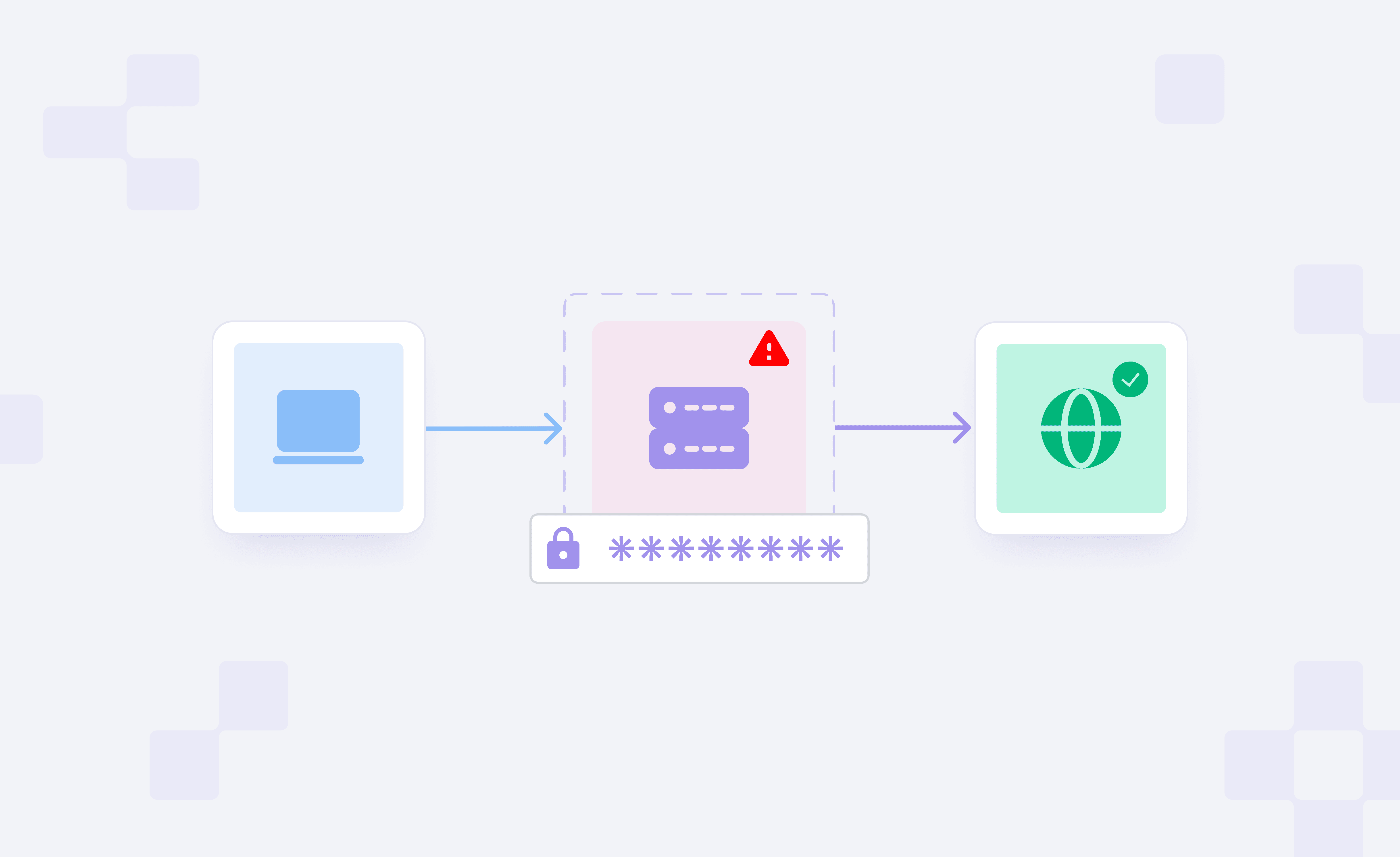
If you are behind a proxy server and your request fails with a 407 Proxy Authentication Required error, the proxy typically requires authentication before forwarding the request.
Unlike many HTTP errors, this response is from the proxy server, not the destination website. It rejects the request until proper credentials are supplied.
In this guide, we will break down the 407 status code, how proxy authentication works, why you are receiving this error message, and some of the most reliable troubleshooting methods to help resolve it.
What Does 407 Proxy Authentication Required Mean and How Does It Work?
The 407 Proxy Authentication Required status code indicates that the proxy server requires valid authentication credentials before forwarding the request. If a client sends traffic through the proxy without those credentials, the proxy blocks the request and returns a 407 response.
Unlike many HTTP errors, the response comes from the proxy server rather than the destination website. The proxy intercepts the request and validates if the client is authorized for that proxy connection.
The proxy uses an authentication challenge to control access. If the request does not include valid credentials, the proxy asks the client to authenticate, usually through the Proxy-Authenticate header, before the request can continue.
Here is how the process generally goes:
- A client sends a request via a configured proxy server.
- The proxy then checks if that connection requires authentication.
- When credentials are missing or invalid, the proxy returns a 407 Proxy Authentication Required response.
- The response includes a Proxy-Authenticate header, which specifies the authentication method the client should use.
- The client resends the request with the required proxy authentication credentials.
- Once the proxy verifies the credentials, it forwards the request to the destination server.
Because this authentication is checked before the website is reached, a failed proxy login causes the connection to fail.
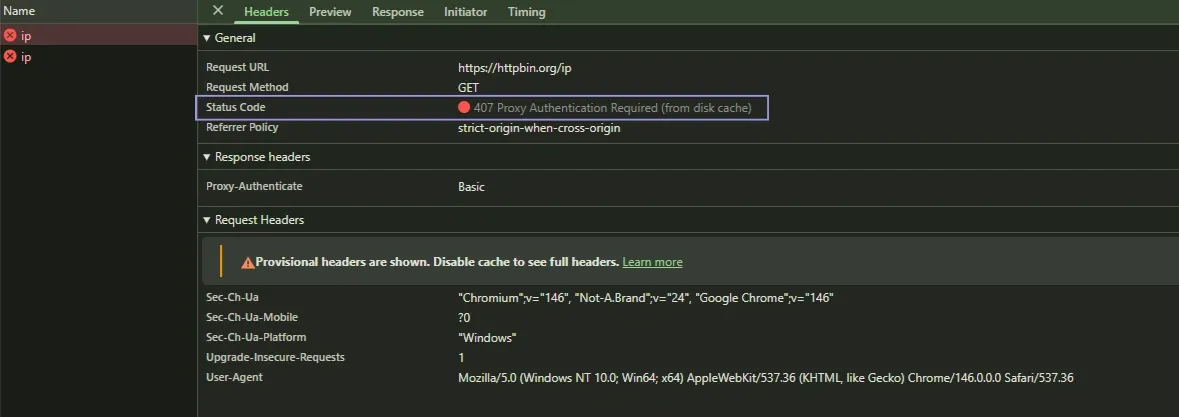
For example, if you try to access a website through a proxy without valid credentials, the request fails and returns a 407 error.
Here’s what that looks like in a real request:
Fixing a Client-Side Issue vs a Proxy-Side Issue
When investigating a 407 error, it is useful to know if the problem originates from the client configuration or the proxy service.
In most cases, the issue is on the client side. These range from incorrect usernames or passwords to formatting issues in the proxy string itself or applications that do not send authentication headers along with the request.
Proxy-side issues are less frequent but can still occur. These might include, for example, the wrong proxy endpoints being utilized, IP allowlist issues (which limit which source IPs are allowed to connect), or authentication requirements on the provider side.
Knowing on which side of the connection the failure occurs makes it easier to track down the cause and implement an appropriate fix.
Common Causes of a 407 Proxy Authentication Error
A 407 Proxy Authentication Required error usually shows up when the proxy can’t validate the credentials sent with a request. In most cases, the issue isn’t the proxy itself, but how the connection is set up or how the credentials are passed.
It can also happen if the proxy expects a different authentication method (like basic, digest, NTLM, or negotiate) or if there’s another proxy sitting upstream in the request chain.
Missing or Expired Proxy Credentials
The most common reason for a 407 response is invalid or missing credentials. If the username or password is wrong, set too long ago for access to be valid, or missing from the request, then the proxy cannot confirm whether that user should have access and will reject it.
This often occurs when credentials are saved incorrectly within an app or when using outdated authentication details.
Wrong Host, Port, or Proxy Format
Proxy connections rely on the proper endpoint and authentication format. If the host, port, or protocol does not match the proxy configuration, the request may fail before authentication even begins, often showing up as a timeout or connection error instead of a 407.
In scripts, command-line tools, or scraping setups, formatting errors in proxy strings can also break authentication.
IP Allowlist or Network Policy Conflicts
Some proxy services only accept traffic from approved source IPs. If your request comes from an IP that isn’t on the allowlist, the proxy may reject it; depending on the provider, this can show up as a 403, a 407, or even a connection failure.
In office environments, network rules can break proxy authentication when they override proxy routing, firewall behavior, or access controls.
Proxy Rotation or Session Settings Breaking Authentication
To do this, proxy rotation systems may rotate sessions or IPs while keeping the same endpoint. If session details or credentials aren’t passed consistently across requests, you can start seeing 407 errors even though the proxy itself is working. Therefore, if the authentication details are not passed consistently when those changes occur, the proxy would reject the request.
Applications that use rotating proxies may require configuration to ensure credentials are passed with every request.
Improper Credential Encoding
If your username or password contains special characters, they may need to be URL-encoded when included in a proxy string. Otherwise, the proxy may read the credentials incorrectly and return a 407 error.
Client Not Sending Authentication Headers
Proxy authentication must be explicitly turned on for some applications. When the credentials themselves are correct, but the proxy receives no authentication headers from the client in the request, it responds with 407.
Why This Matters When You Troubleshoot
Most 407 errors fall into one of two buckets. Either the credentials or the proxy details are wrong, or the client is not sending the authentication as the proxy expects.
That is why the fastest way to fix this error is to check the basics first: credentials, host, port, format, allowlist rules, and whether the client is actually sending proxy authentication with every request.
How to Resolve 407 Proxy Authentication Required?
Typically, fixing a 407 Proxy Authentication Required error involves either correcting the proxy credentials or reviewing the proxy connection configuration. The precise steps vary by the location of the proxy usage.
Browser and Local Device Checks
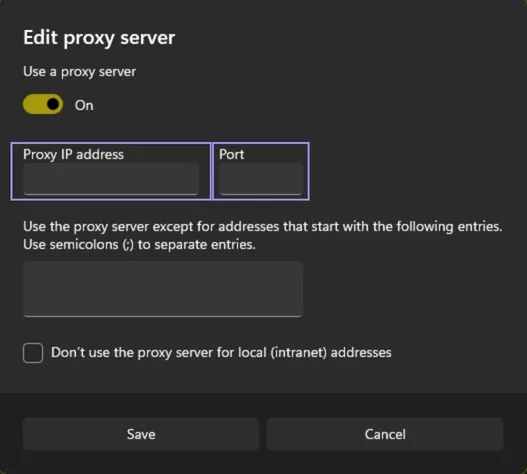
We can start by checking the system/application proxy settings, especially if it appears in a browser or a desktop application.
Ensure correct proxy address and port. Authentication failed before the connection could continue when a request was sent to the wrong endpoint.
Check the username and password used for the proxy connection. Browsers and operating systems sometimes save these credentials, so manually clearing the old entries and re-entering them can be useful.
It’s also a good idea to see whether VPN software, firewall rules, or filtering tools are contributing to the problem. Such tools may ignore your proxy settings and interfere with authentication. If proxy has been already setup but not sure, you can check proxy server address to cross-check details.
cURL and Command-Line Configuration
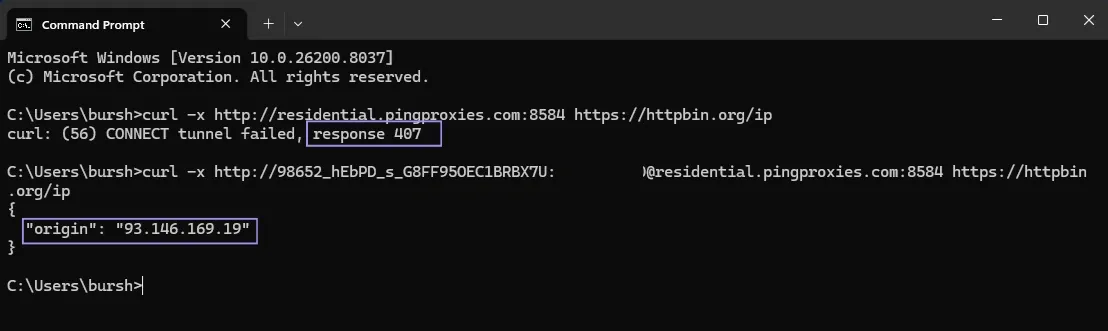
For example, when using tools such as cURL, a 407 error generally indicates an issue with the proxy string or authentication syntax.
First, check that the proxy endpoint is correct. Then make sure the credentials appear in the request exactly as expected. Small formatting errors can cause the authentication header to be generated incorrectly.
The fastest way to check whether the proxy accepts authentication is to run a simple test request. If that minimal request succeeds, the issue is more likely with how your main command or tool is formatting the proxy settings.
In our test, the request failed with a 407 error without credentials but succeeded as soon as the proxy string included the username and password.
Python, Node.js, or Scraper Configuration
Proxy authentication in scripts and automation workflows depends on how the HTTP client or request library handles proxy settings.
Make sure the proxy configuration is correctly passed into the application, and the authentication details are included with the request. If the application uses any environment variables, those should be validated as well.
A smaller test using the same proxy can help you tell whether the issue is in the proxy settings themselves or in how the tool generates the request.
Server and Application Log Checks
Logs can help uncover where the authentication process is failing if the cause of the error is not immediately evident.
There are many HTTP clients, automation frameworks, and server environments that log the responses from proxy servers. These logs indicate whether credentials were added to the request and how the proxy handled them.
This output can often point to missing authentication headers, incorrect formatting, or other configuration issues.
Proxy Configuration and Provider-Specific Factors
These types of authentication failures can be due to misconfiguration on the proxy service side, rather than an issue in the client itself.
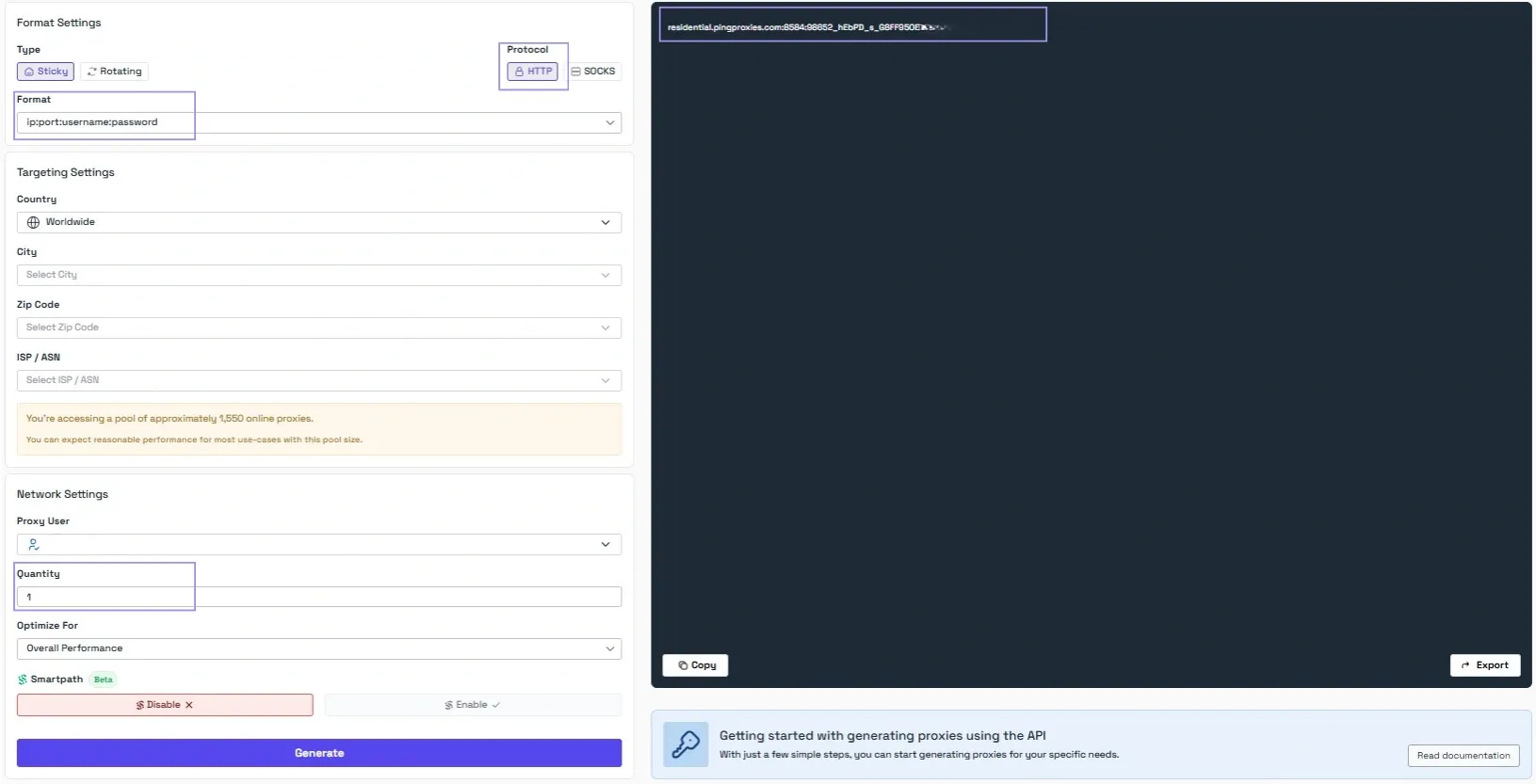
A 407 response could, for instance, result from using the wrong proxy endpoint, mixing and matching authentication methods, or sending credentials in an incorrect format. Some proxy configurations may want to set up authentication in headers rather than putting credentials in the proxy URL.
You can refer to the provider's configuration guidelines to structure your request correctly.
When the Issue May Be Provider-Side
If all these tools, devices, or environments return the same 407 error, they might not rely solely on your local configuration. In those cases, more than one proxy provider might have to validate the request.
While opening a support ticket, include the endpoint where it failed, the request time, the tool or app you’re using (like a curl command), and a clear example of what happened, including the exact error output and steps to reproduce it.
Authentication issues can be tricky to diagnose, so having reliable support makes a big difference. We currently maintain a 4.7/5 rating on Trustpilot, which reflects how important fast and helpful support is when you're dealing with proxy configuration issues.
How 407 Is Different From 401, 403, and 502?
Some of these HTTP errors may seem similar, but they occur at different stages of the request process. It is crucial to understand what these status codes mean so we can determine where the issue lies.
407 Proxy Authentication Required. This error occurs at the proxy layer. This request was blocked because the proxy server requires valid credentials, but it didn't get them before attempting to pass along the request.
The table below contrasts 407 with some other common HTTP errors.
| Status Code | Where the Error Occurs | What It Means |
|---|---|---|
| 407 Proxy Authentication Required | Proxy server | The proxy requires valid authentication credentials before forwarding the request. |
| 401 Unauthorized | Destination server | The server requires authentication from the client before allowing access to the resource. |
| 403 Forbidden |
Destination server |
The server understood the request but refused to allow access, even if authentication was provided. |
| 502 Bad Gateway | Gateway or proxy between servers | The server acting as a gateway/proxy received an invalid response from an upstream server. |
The important difference is where the request fails. Error codes 401 or 403 are generated by the destination server itself, while a 407 error occurs before the request even reaches the website. The distinction is key for further troubleshooting to determine whether the failure is a proxy authentication issue or with the accessed website.
How to Prevent 407 Errors Going Forward?
After the reason for the 407 Proxy Authentication Required error is resolved, a few simple practices can lower the chances of getting it again.
For Browsers and Office Networks
In situations where proxies are defined at the system level, it is useful to have uniformity between proxy settings and applications/devices. Authentication can fail due to incorrect addresses, ports, or saved credentials.
If several users share the same network configuration, documenting the correct proxy settings can prevent minor configuration mishaps.
For Bots, Scrapers, and Automation Workflows
Most automation tools use proxy strings or just static variables in their config. Having the credentials, proxy endpoints, and authentication formats in place correctly will help avoid multiple authentication issues.
Testing that you can hit the proxy with a simple request before running an entire workflow will also validate your authentication setup.
For Team Environments Using Shared Proxy Credentials
If many developers or systems use the same proxy access, it would make sense to maintain clear configuration standards. Store shared credentials securely and provide updates as necessary to prevent obsolete authentication information from being reused.
A consistent setup reduces authentication failures and makes troubleshooting easier when a problem arises.
