
PHP Proxy: Setting Up and Using Proxies
Using a PHP proxy refers to writing PHP scripts that connect to proxy servers while making outbound HTTP requests. One can accomplish this with cURL or native stream functions to communicate with external APIs and web servers.
In this article, we demonstrate how to set up proxies using PHP, starting with basic configuration and progressing to more advanced scenarios, including authentication and proxy rotation. Finally, we’ll see how to choose the right proxy type and spot common proxy errors.
Before diving deep into the hands-on sample scripts, let’s first clear up some common misconceptions around what a “PHP proxy” actually means.
What “PHP Proxy” Means in Real-World Scraping Setups
Though the term “PHP Proxy” is used loosely, it does not refer to a specific type of proxy, nor does it have anything to do with how proxy servers work. It simply means connecting to a proxy server with PHP scripts.
In the context of scraping or automation, PHP acts as a client that sends outbound requests to proxy providers before they are sent to the destination servers. This helps to hide the device’s real IP and avoid bans. All the target website sees is the proxy server’s IP address, which enables you to distribute traffic, access location-restricted content, and protect your local IP address reputation.
Importantly, PHP proxies traffic at the request level. You can also deploy authentication and rotation by modifying the PHP scripts accordingly.
How to Set Up a Proxy in PHP?
Most PHP proxy scripts rely either on cURL or the native stream contexts to configure requests. Both approaches allow you to specify a proxy address and configure request-level behaviour.
We have discussed these procedures in the following sections.
Setting a proxy in PHP using cURL
cURL is the simplest way to send proxy requests from PHP. Once set, every request made using that cURL handle is routed through that proxy.
Here we demonstrate a minimal setup using cURL to make requests via an HTTP proxy.
This sends a request to an IP echo endpoint, which returns the IP seen by the destination server. To confirm routing, we can run the script and check if the returned IP matches the proxy server.

This confirms that the request is being routed through the proxy as expected.
Furthermore, we have also discussed a few more advanced cases, including authentication and rotation, in later sections.
Using stream contexts for proxies in PHP
Stream Contexts offer a simpler, built-in alternative to cURL for basic network operations. This makes use of PHP’s native stream functions for simpler scripts or legacy code. Here’s the script:
You can see the proxy is configured inside the stream context itself. You might have noticed that we changed the IP this time because the previous one was refusing stream-based connections. Luckily, the second one got us through.

However, stream contexts offer less control and are less reliable than cURL. So we will be using cURL for the advanced cases discussed further.
Proxy support in PHP frameworks and HTTP clients
Using a framework or an HTTP client does not change how proxies work. In most cases, these tools also rely on cURL, which means proxy features such as authentication, rotation, and routing behave the same way.
If a proxy works with raw cURL, it will behave the same way when used through a framework or HTTP client. So, yes, everything covered in this article still applies if you’re using Laravel, Guzzle, or Symfony.
Proxy Authentication in PHP
Production-level proxy usage asks for authentication to control access, manage load, and prevent abuse. In PHP, this is handled by passing proxy credentials directly to cURL.
The following script demonstrates how to configure proxy authentication in PHP.
Here, the proxy address is set using CURLOPT_PROXY, while authentication is configured via CURLOPT_PROXYUSERPWD in the username:password format. cURL automatically sends these credentials to the proxy as part of the request.
We can run the script to verify authentication and confirm if the returned IP is different from our local IP.

If credentials are incorrect or missing, the proxy will return a 407 Proxy Authentication Required error, as described subsequently.
Fixing 407 Proxy Authentication Required errors
A 407 proxy authentication error indicates that the proxy server is receiving a request, but with incorrect credentials. This error message comes from the proxy server before the request reaches the destination server.

Restoring the correct authentication details using the CURLOPT_PROXYUSERPWD => "username:password" fixes this error.
Using Rotating Proxies in PHP
You can implement IP rotation per request or per session through rotating proxy services, depending on the scraping requirement.
Rotating proxies offer higher anonymity and greater resistance to IP blocks, whereas sticky sessions maintain the same IP for a specific time frame. The following sections explain both of these methods.
Rotating proxies per request in PHP
Proxy rotation in web scraping is a common tactic to avoid bans or rate limits. This helps you serve requests with a different IP each time without changing the underlying code.
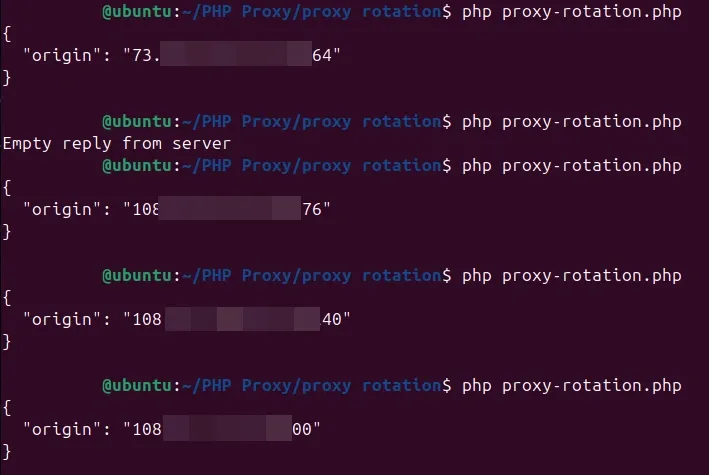
Here is a simple PHP script that rotates proxies with every request by automatically selecting an IP address from a predefined IP pool.
Running the script multiple times verifies proxy rotation, with different IPs being returned on each execution.
Session-based and sticky proxy rotation
Sticky or session-based proxies are useful for workflows that require multiple requests to originate from the same IP address.
We also support sticky and static proxy sessions for various use cases, including e-commerce, web scraping, and long-term testing. Sticky sessions are powered by real user devices, helping you keep the same IP address for extended periods. Similarly, static proxies can keep the same IP addresses for up to seven days.
Please note that sticky or session-based IP sessions don’t affect PHP scraping logic but you need to check which setting is best for your scraping workflow as some websites require a static IP address through a session, for example, if you add a product to cart on a shopping website, it may also expect you to have the same IP address at checkout and you may see an error if not.
There is no need to change the proxy endpoints because session behaviour is managed entirely by the proxy provider.
Free Proxies vs Paid Proxies for PHP
Free and paid proxies can behave differently when used with PHP scripts.
While free proxies are easily available, paid proxies provide features such as authentication, rotation, and sticky sessions. In addition, paid proxies are more consistent and face fewer blocks due to a comparatively good IP reputation. That's why understanding these differences helps avoid misattributing proxy-related failures to PHP or scraping logic.
The most widespread issue with free proxies is unreliable HTTPS tunneling, which can result in connection issues while connecting to secure websites such as banking or government portals.
Moreover, frequent timeouts, slow connections, and excessive CAPTCHA make it practically impossible to use free proxies in production.
Choosing the Right Proxy Type for PHP Scraping
Datacenter proxies
Datacenter proxies are the most cost-effective of the lot and are typically priced per IP address. You’ll get high speed and predictable uptime, making them suitable for bulk automation tasks.
These IPs are issued by hosting or cloud infrastructure providers rather than residential ISPs. Generally, they are allotted to multiple users at once, making them susceptible to frequent blocks or CAPTCHAs.
However, our datacenter proxies are dedicated and private, meaning they aren’t shared among users. This improves the overall security and proxy performance. In fact, we do not deal in shared datacenter proxies at all.
Residential proxies
Residential proxies provide IPs relating to real-world consumer devices, making them most effective against IP-based restrictions.
On the downside, residential proxies suffer from bottlenecks applied to practical usage. In simpler terms, this means the proxies won’t be as fast. Moreover, they are quite expensive compared to datacenter proxies and are often billed based on bandwidth consumption rather than IP count.
Static Residential (ISP) proxies
Static residential proxies are also sourced from ISPs, but they provide IP stability, which isn’t there with typical residential proxies.
Also, they often have high bandwidth limits and offer better speeds.
Put simply, ISP proxies nicely sit between datacenter proxies and residential proxies in terms of blocking resistance, speed, and anonymity.
How to Verify That PHP Requests Are Using a Proxy
We have already verified outbound IP addresses in previous sections, including with proxy setup, rotation, and authentication. Each time, the response IP was different from the local address, confirming successful proxy routing.
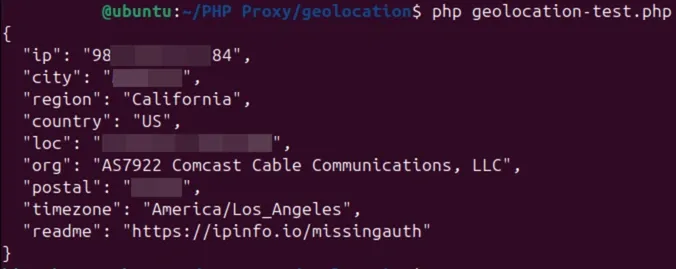
In the subsequent section, we will check the geolocation metadata of the originating IP by querying a different endpoint to retrieve parameters such as country, region, latitude, longitude, and zip code.
Verifying proxy geolocation and routing
The following PHP script is similar to what we used with proxy authentication. The only difference is updating the request URL to https://ipinfo.io/json since we are interested in location metadata this time.
Running the script outputs the geolocation details, which one can check against the proxy configuration to confirm that routing is working as intended.
Common PHP Proxy Issues
PHP proxy errors are mostly related to how networking is handled by cURL and reported as cURL error codes. These codes indicate possible issues at the transport or proxy layer, which is well before the request reaches the destination server.
The official documentation contains the most common errors and their solutions. Below are some of the issues most frequently encountered by PHP developers.
- SSL and HTTPS errors generally occur when the proxy fails to establish a secure tunnel for encrypted traffic. It may be caused by improper SSL/TLS handshake, misconfigured local client or remote server’s certificate, or limitations in the proxy’s SSL support.
- Timeouts and blocks typically affect low-quality free proxies, which usually operate under heavy loads or use IPs that are already flagged by the target server.
- Connection timeouts can also be the root cause since proxies introduce additional latency. Therefore, a request may fail while still connecting or if the timeout limits are set too low.
- Other errors may arise from incorrect proxy authentication, using the wrong proxy type, or the limitations applied by the proxy provider.
Wrap Up
This was a brief write-up on how to configure and use a PHP proxy. To clarify again, it’s about accessing proxies with PHP scripts and has nothing to do with specific proxy servers themselves.
We have seen techniques such as cURL for networking, proxy rotation, authentication, and routing validation.
Finally, note that PHP is rarely the root cause of proxy failures, as most issues (such as broken HTTPS tunneling or IP blocks) arise from unreliable proxy infrastructure. Resorting to quality providers like us can largely subdue these issues, however.
