
Python Requests Timeout: Guide to Stable HTTP Requests

When you send an HTTP request to a server, you expect a response. Sometimes that response arrives in milliseconds. Other times, the server is slow, overloaded, or completely unresponsive.
Without a timeout configured, your Python script may appear to hang for a very long time while waiting for a response. This creates real problems in production environments. And if you're running a web scraper or data pipeline, a single unresponsive server brings your entire workflow to a halt.
This guide covers how to set timeouts correctly, handle the exceptions they raise, and avoid common mistakes.
Why You Need Timeouts in Python Requests
The Requests library is the most popular HTTP client for Python, with over four million GitHub repositories depending on it. Despite its popularity, Requests has no default timeout (the limit you set for how long your code waits for a response), which is a risky default.
To understand why this matters, consider what happens when you make a request without specifying a timeout:
This code sends a GET request to a test endpoint that intentionally delays its response for several seconds. During that time, your script sits idle waiting for a reply. If you don’t set a timeout, Requests itself won’t time out. Your program may appear to hang for a long time (until the underlying network stack gives up).
You won't see an error message. You won't get a traceback. The process simply stops doing useful work.
Now compare that to a request with a timeout configured:
This version waits up to five seconds before giving up. If the server fails to respond within that window, Requests raises a Timeout exception. Your code can catch that exception, log the failure, and continue processing other tasks.
The difference between these two approaches becomes critical at scale. If you're scraping thousands of pages or polling dozens of APIs, a single slow endpoint without a timeout can block your entire operation.
Timeouts protect your application from:
- Frozen scripts that need manual intervention
- Wasted CPU cycles spent waiting on dead connections
- Resource exhaustion from sockets and threads blocked indefinitely in concurrent applications
- Poor user experience when your service becomes unresponsive.
That’s why every HTTP request in long-running or production systems should include a timeout.
How to Set Timeouts in Python Requests
There are three main ways to set timeouts in the Python Requests library. Each one fits different situations. Here's how each method works.
Method 1: Single Timeout Value
This is the easiest way to set a timeout. You pass Requests a specific timeout value (e.g., “timeout=5” in the example below), and that value is applied to both the connection phase and the response read phase.
With “timeout=5”, Requests will wait up to 5 seconds to connect, and up to 5 seconds between bytes received while reading the response. It is not a hard cap on the total request duration. If the server continues sending data, the request can run longer than five seconds overall.
If either phase exceeds the timeout value, Requests raises a timeout exception instead of leaving the request hanging.
This method works well when:
- The website usually responds quickly
- You want simple code
- You do not need fine control yet
Method 2: Tuple Timeout (Connect, Read)
Sometimes one timeout value is not enough. Reaching a website and waiting for its response are two different steps, and they do not always take the same amount of time. For example, here, instead of just putting something like “timeout=2.5”, we’ve put “timeout=(3,10)”.
Why use two different values? The connect phase should be fast. If a server exists and is reachable, connecting takes milliseconds to a few seconds. The read phase can take longer, especially if the server needs to perform heavy work, such as generating a report or querying a database.
If you use timeout=30 for a slow API, you're also waiting 30 seconds to discover the server doesn't exist. That's wasted time you could spend retrying or showing an error message.
With a tuple, you fail fast on connection problems while still allowing time for legitimate server processing.
Let’s test this using a public endpoint that simulates slow server responses:
This request succeeds because connecting to postman-echo.com takes less than three seconds, and the five-second delay is less than the 10-second read timeout.

Now let's see what happens when the read timeout is too short:
In this example, the connection succeeds because Python has enough time to reach the server. However, the server waits five seconds before responding, and the read timeout is set to only two seconds. As a result, the request fails while waiting for the response body, not during the connection.
Depending on network conditions, timeout errors can vary, but the key idea remains the same: connection timeouts relate to reaching the server, while read timeouts relate to waiting for the server’s response.
Method 3: Session-Level Defaults
If you make many requests in your application, typing “timeout=5” every time gets repetitive. It's also easy to forget one and create a hanging request.
Sessions let you set a default timeout for all requests. However, Python's requests.Session() doesn't have a built-in way to set a default timeout. You have to add one yourself.
The solution is to create a custom transport adapter. It sits between your session and the network. You create one that adds a timeout to every request.
Here's what's happening:
- You create a TimeoutAdapter class that extends the built-in HTTPAdapter.
- You store a default timeout when the adapter is created.
- In the send method, you check if a timeout was provided. If not, you use the default.
- You mount the adapter to both http:// and https:// URLs.
Now every request through this session has a timeout, even if you forget to add one. Additionally, you can still set a different timeout for specific requests:
Here's a full example you can run to see sessions in action: Python Requests Timeout
Note: We use Postman Echo for this example instead of httpbin.org because it provides more consistent delay behavior and avoids intermittent DNS and connection issues during testing.
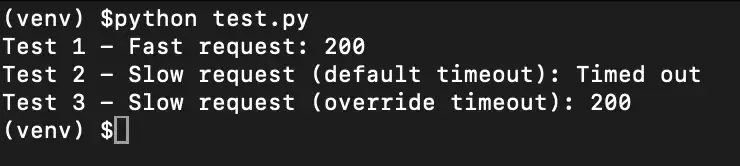
When you run this, you'll see:
- Test 1 - Fast request: 200
- Test 2 - Slow request (default timeout): Timed out
- Test 3 - Slow request (override timeout): 200
Handling Timeout Exceptions
Setting a timeout is only half the solution. When a request exceeds your configured limit, Requests raises an exception. If your code doesn't handle that exception, your program crashes.
Proper exception handling lets you log failures, retry requests, fall back to cached data, or gracefully inform users that something went wrong.
The requests.Timeout Exception
The requests.Timeout exception is the parent class for all timeout-related errors. It catches both connection timeouts and read timeouts, which makes it useful when you want to handle all timeout scenarios the same way.
In this example, the endpoint intentionally delays its response by 10 seconds, but we've set a two-second timeout. The request fails, and instead of crashing, the program prints a friendly error message.

For many applications, catching the general Timeout exception is sufficient. You know the request failed due to timing, and you can respond appropriately. However, there are situations where you need to distinguish between connection failures and read failures.
ConnectTimeout vs ReadTimeout
Requests provides two exception types that give you more granular control over error handling: ConnectTimeout and ReadTimeout. Here’s how they differ from each other:
requests.ConnectTimeout is raised when your client cannot establish a TCP connection to the server within the allowed time. This usually indicates network issues, firewall restrictions, or a server not accepting connections. DNS failures typically raise ConnectionError (name resolution error), not ConnectTimeout.
requests.ReadTimeout is raised when the connection succeeds, but the server takes too long to send its response. This usually means the server is overloaded, the query is taking too long to process, or the response payload is large, and the transfer is slow.
Here's how to handle each type separately:
In this example:
- Python waits up to two seconds to reach the server
- Python waits up to five seconds for the response
- The connection succeeds, but the response takes too long, so a ReadTimeout is raised

Why does this distinction matter? The appropriate response differs based on the failure type.
- A connection timeout might indicate a network outage or misconfigured firewall, problems you should alert on immediately.
- A read timeout might indicate temporary server load, something worth retrying after a short delay.
If you're building a scraper that hits thousands of URLs, you might want to immediately skip URLs that fail to connect (the server is probably down) but retry URLs that time out during reading (the server is just slow).
Best Practices for Timeout Configuration
After working through the mechanics of timeouts, here are the key principles for configuring them effectively.
- Always set a timeout: This rule has no exceptions. Every HTTP request in production code needs a timeout value. The Requests library will wait forever by default, and a single missing timeout can hang your entire application.
- Use separate connect and read values: Connection should happen fast, typically within two to five seconds under normal conditions. Reading data takes longer, especially for large responses or slow servers. Setting these separately lets you fail fast on unreachable servers while giving responsive servers adequate time to send their data.
- Set the connect timeout slightly above three seconds: On many systems, TCP retransmission happens on multi-second intervals, so this allows at least one retry before failing. A connect timeout in the 3-5 second range works well for most applications. It’s long enough for normal network hiccups, but short enough to fail quickly when a server cannot be reached.
- Adjust timeouts based on what you're requesting: Fast REST APIs might need only five to 10 seconds total. Endpoints that run complex queries or return large datasets might need 30 seconds or more. File downloads might need even longer, or you might want to use streaming with per-chunk timeouts instead.
- Log timeout events: Track which endpoints timeout and how often. Frequent timeouts from a specific server might indicate a problem on their end, or it might mean your timeout values are too aggressive. This data helps you tune your configuration.
- Combine timeouts with retry logic: A single timeout doesn't mean permanent failure. Implementing retries with exponential backoff makes your application resilient to transient network issues and temporary server overload.
Consider circuit breakers for production systems: If a service is consistently timing out, continuing to send requests wastes resources and can make the problem worse. Circuit breaker patterns stop sending requests to failing services for a period, giving them time to recover.
Common Timeout Problems and Solutions
Even with proper timeout configuration, you'll encounter situations where things don't behave as expected. Here are the most common issues and how to address them.
Frequent ConnectTimeout Errors
If you're seeing many connection timeouts, the problem is usually network-related. The server might be down, your DNS resolution might be slow, or a firewall might be blocking connections.
Start by verifying you can reach the server at all using tools like ping or curl. If the server is reachable but connections are slow, try increasing your connect timeout or investigate DNS caching to speed up resolution.
ReadTimeout on Large Responses
Large response payloads take time to transfer. If you're downloading files or receiving large JSON responses, a 10-second read timeout might not be enough. Either increase the read timeout for these specific requests or use streaming to process the response in chunks.
With streaming, the read timeout applies to socket inactivity. A timeout occurs only if no bytes are received for the duration of the timeout, which allows large transfers to complete as long as data continues to arrive.
Proxied Requests Timing Out
When you route requests through a proxy server, every request has additional network hops. The connection goes from your client to the proxy, then from the proxy to the target server. This adds latency that your timeout values need to account for.
If you're using proxies for web scraping or data collection, increase your timeouts by at least a few seconds to account for the additional round-trip time. Our residential proxies are optimized for low latency, but you should still test timeout values with the proxy in place to avoid false failures.
If you’re working on scraping workflows, this list of scraping tools for developers is a useful starting point.
Inconsistent Timeout Behavior Across Environments
Timeouts that work fine in development sometimes fail in production. This often happens because of network differences.
Your development machine might have a fast, direct connection to the server, while production traffic routes through load balancers, firewalls, or geographic distance. Test your timeout values in an environment that closely matches production.
Build Stable HTTP Requests in Python
Reliable HTTP requests need appropriate timeout configuration and proper exception handling. The techniques in this guide give you the foundation to both.
When you route requests through a proxy for scraping or automation, each request travels through an additional server before reaching the target. This extra hop adds latency that your timeout values need to account for.
If you're combining timeout handling with proxy rotation, increase your connect timeout by two to three seconds to avoid false failures. Rotating IP addresses reduces block rates, but the trade-off is slightly higher latency per request. We offer residential and ISP proxies designed for scraping and automation workflows where both reliability and low latency matter.
Test your timeout configuration with the proxy in place. Values that work on a direct connection often need adjustment when traffic routes through a proxy network.
