
Best IP Scrambler: Features, Benefits, and How to Choose One
When surfing the internet, websites can use your IP address to record some information about you, like your geographical location or the ISP you’re connected to. While this information doesn’t personally identify you, it can be used besides other additional information to create an identifiable digital fingerprint that’s used to track your online activity on a website.
Those who are concerned about privacy, security, or bypassing geo-restrictions can look for legitimate ways to hide their real IP address to overcome these challenges. One common way to achieve this is by using an IP scrambler.
In this article, we’re going to explain what an IP scrambler is, what benefits it provides, and the main points to consider when choosing one. We’ll also show a step-by-step example of using an IP scrambler to hide your IP address.
What is an IP Scrambler?
IP scrambling is a general term for the process of changing a client's actual IP address to prevent it from being recorded or tracked. The term “IP scrambler” doesn’t refer to a specific type of device, hardware, or software. Rather, it describes any technology that implements a technique to enable users to change their IP addresses.
For example, the most common types of IP scramblers being used nowadays are proxies and VPNs. Technically speaking, these services don't actually scramble the IP address given to you by your Internet Service Provider (ISP) by randomly modifying its values; if this happens, you won’t be able to have working internet connectivity at all.
But what these services actually do is mask or hide your real IP address and let you browse the internet using a different IP address they provide. This IP address typically comes from a different geolocation and may be provided by a different service provider than your actual ISP, making it hard to track your real identity.
Benefits of IP Scrambling
Whether you’re a casual internet user, a professional with specific use cases like web automation or multi-account management, or an enterprise with a large-scale server infrastructure, masking your IP address while accessing internet resources can bring a lot of benefits, including:
- Enhanced privacy: As we mentioned, your IP address can reveal some information about you that websites can use to track your activity. Masking your IP address prevents websites and other data collectors from detecting your location or ISP, making it harder to build a profile of your online activity.
- Bypassing geo-restrictions: Because you’re using an IP address from a different location, you can access websites or content that’s restricted from your original IP address location. However, some online services still use other techniques to detect your location, such as checking your payment method, account region, or DNS settings.
- Enhanced Security: Some cyber threats or attacks target systems by IP address. By masking your real IP, it becomes harder for such attacks to target your device. An important thing to consider here is that although masking your IP can reduce exposure to some IP-based targeting, it doesn’t replace endpoint security like patching your system or having a firewall, and it won’t also prevent threats delivered through links, downloads, or account compromise.
- Overcoming IP bans: Some websites can block certain IP addresses based on their activity. You can use an IP-scrambling service, such as a Proxy that frequently changes your IP address, to overcome this blocking.
- Web automation activity: Tasks such as web scraping or testing automation that require frequent requests to websites can be blocked by anti-bot detection systems on those websites. By frequently changing your IP address, these tasks can go undetected and continue working. It’s also strictly required when running automation tasks to ensure you respect the website’s Terms of Use and follow the usage policies highlighted in the robots.txt.
VPNs vs Proxies for IP Scrambling
Among the different IP scrambling methods, Proxies and VPNs are the most common and user-friendly techniques. They both offer a reliable way to hide your original IP address and use a different one, but they differ slightly in how they work and what they offer users.
VPNs
VPNs create a tunnel by encapsulating and encrypting your traffic as it leaves the client device and travels to a remote VPN server. The server then masks your original IP address and routes the traffic to the internet using a different IP address.
Using VPNs involves installing a VPN client on your device, which can be built into the operating system or installed as a third-party application. VPNs are used OS-wide, which means all the operating system and application traffic is routed through the VPN.
Proxies
Proxies act as gateways through which your internet traffic is routed. When your traffic reaches the proxy service, it replaces your IP address with a different one, typically originating from a different geolocation of the proxy.
Proxies are usually easy to configure with no installation required. You just add the proxy information in a specific format to your Operating system or application. Proxies can also be faster in most scenarios as they directly route the traffic with minimal or no overhead.
Depending on the proxy protocol, only some specific applications’ traffic might be routed through the proxy, while others might not use the proxy if they use a different protocol. You can also add proxy configuration to specific applications to explicitly specify that their traffic should be routed through the proxy.
Considerations When Choosing an IP Scrambler
If picking the best IP scrambler for your needs seems confusing, we’ve compiled a list of the most important points to consider when choosing your IP scrambler:
- Privacy and anonymity: The level of anonymity that an IP scrambler provides is of utmost importance for your choice. If it’s a top priority to have high anonymity for your tasks, you can think of using a residential or an ISP proxy while affording the extra cost. You can also combine your proxy with an anti-detect browser for even better privacy and anonymity, as they reduce some fingerprint consistency across profiles.
- Security: Consider the security features offered by the proxy service provider, the type of proxy, or a VPN. Typically, VPNs provide the highest level of security.
- Speed and performance: Consider things like the network latency added and the available bandwidth for an IP scrambler. Generally, datacenter proxies and ISP proxies can be the best in terms of speed, unlike VPNs, which usually have the highest network overhead.
- Reliability and stability: Some proxy providers can have higher uptime and better infrastructure. Consider this if the proxy availability is a major concern.
- Cost: Different proxy types can have varying costs depending on the features they provide. If you prioritize paying the lowest cost, consider what other feature you can sacrifice in return. You can use a datacenter proxy for getting the lowest prices while having less anonymity, or choose an ISP proxy for striking a balance between both.
Note: It is important to avoid free proxies and VPNs, as they can have significant downsides, such as ad injection, tracking, or even malware.
Using a Proxy as an IP Scrambler
Now that we understand the main concepts around IP scramblers, let’s put this into practice by utilizing a proxy service to mask our IP address. For this guide, we’ll use the proxy service from Ping Proxies for demonstration, but the approach should be the same with other proxy providers, even if the steps differ.
With Ping Proxies, you can generate a proxy in just a couple of clicks. All you need to do is create an account and generate the type of proxy you want from the dashboard. The best part is that you get a 1GB free residential bandwidth post KYC verification.
You can choose from different proxy types, including ISP, datacenter, and residential.
Generate Static Proxies (Datacenter & ISP)
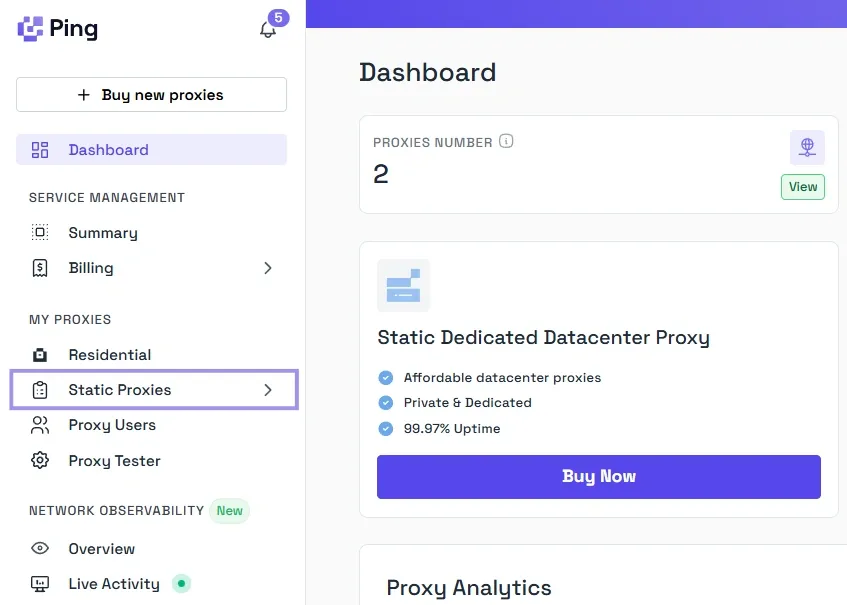
If you’ve bought a static proxy offering from Ping Proxies, start by clicking on Static Proxies from the left pane under the My Proxies section.
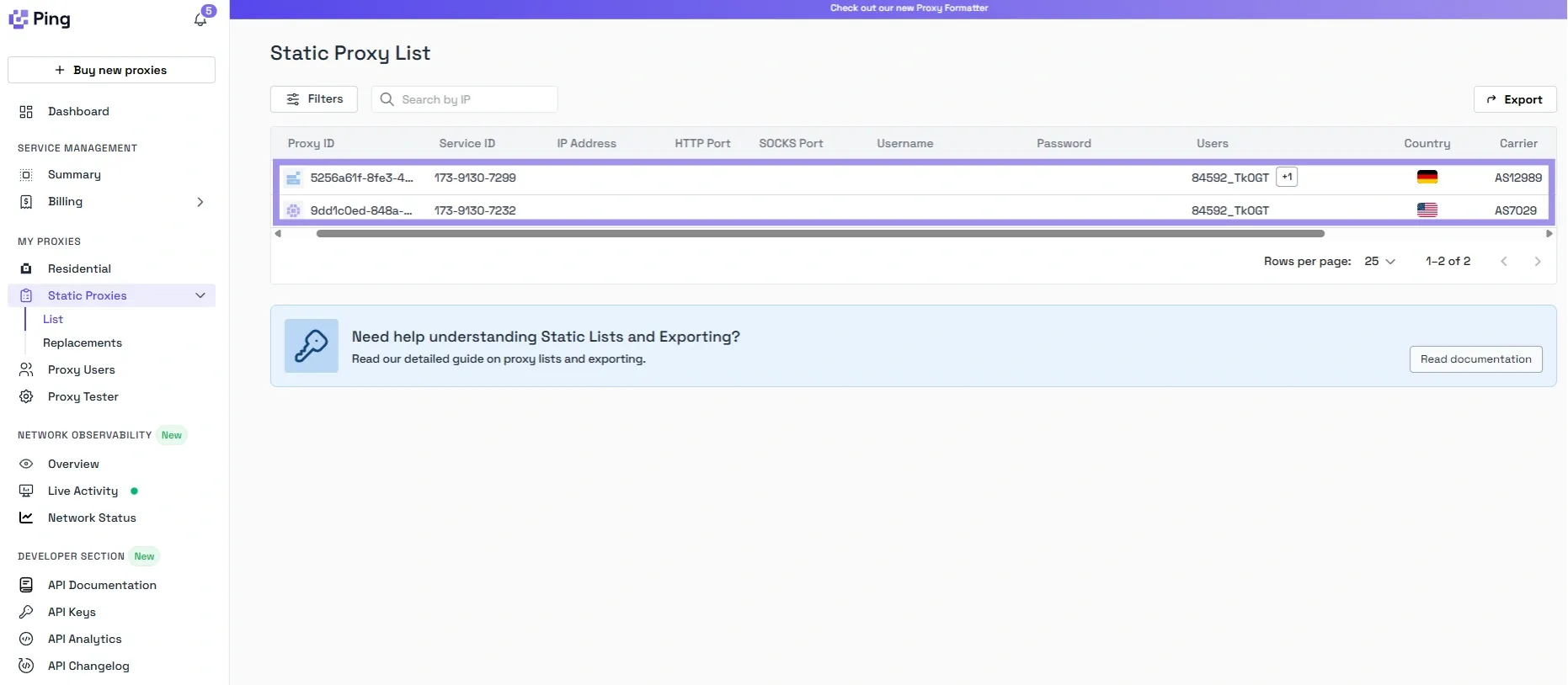
You’ll see the list of proxies you have with their details, including hostname (IP address), port, username, and password. You just need to copy these details to add them to your application or operating system.
Generate Residential Proxies
Residential proxies need a couple more steps for their setup, offering you different options to tailor the configuration for your specific requirements:
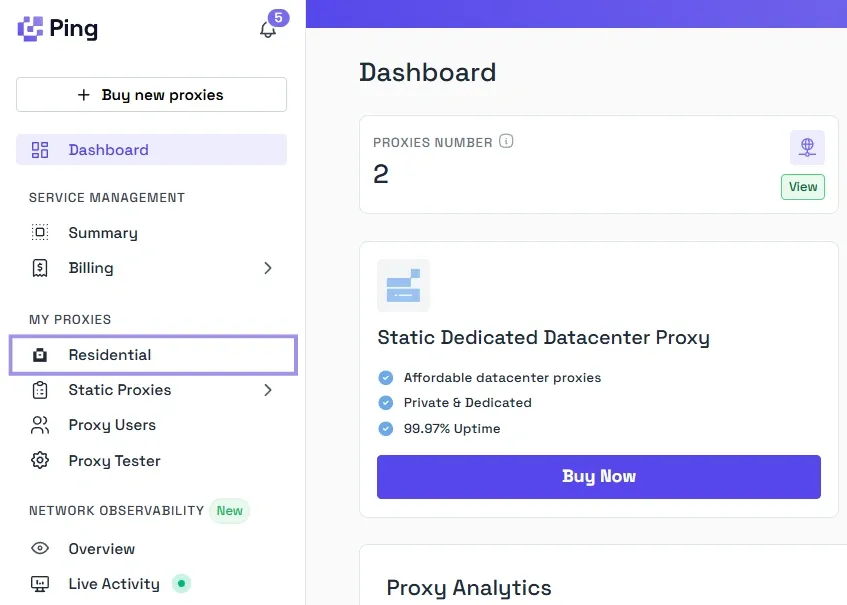
1. Under the My Proxies section in the dashboard, select Residential.
2. Under the Format Settings, choose the type of residential proxy you want, whether sticky or rotating, and select the protocol. We support HTTP, HTTPS, and SOCKS5 protocols. You can then choose the format you want to generate proxy details in.
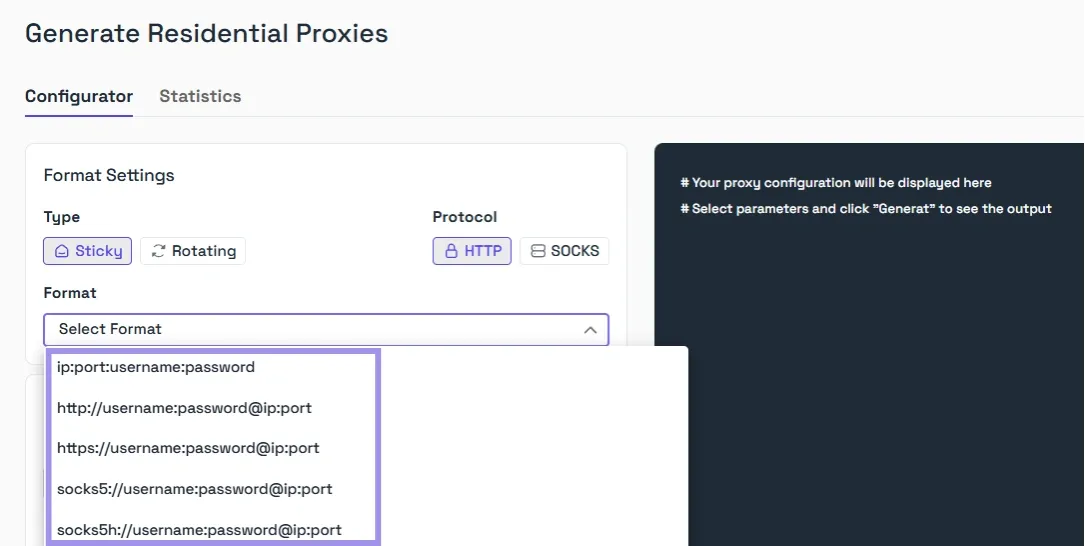
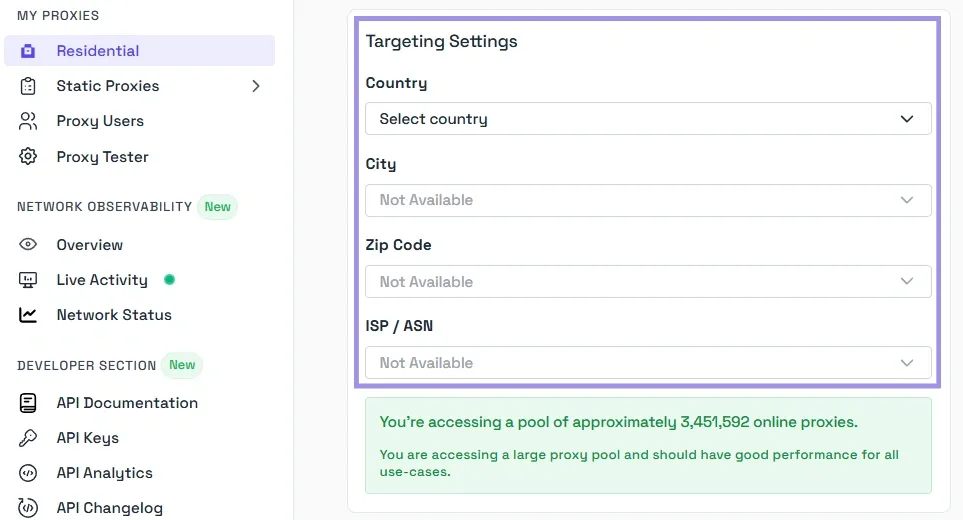
3. We provide you with total control over the targeting settings, including Country, City, Zip Code, and also the ISP/ASN if required.
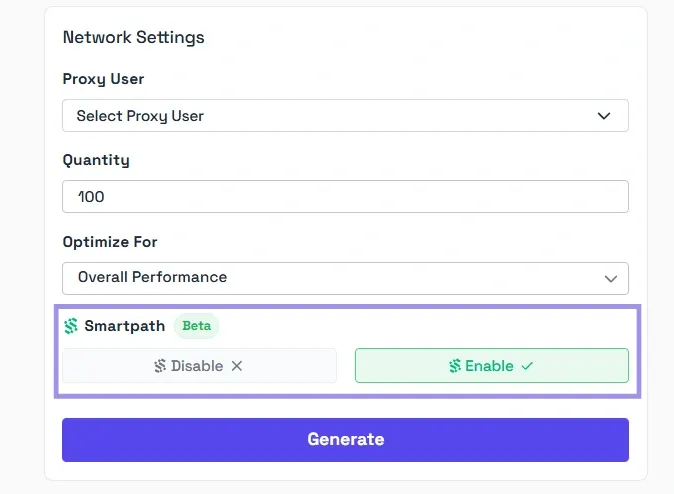
4. Finally, enter the quantity, then click Generate. The proxy details will be displayed in the format you’ve selected. If you’re wondering what Smartpath is, it is a free in-house AI routing system that sends non-essential traffic via datacenter IPs. Enable it to reduce residential bandwidth and costs.
Once the proxy is generated, you can add its details to your application. But first, let’s understand what each part in the generated proxy means.
Typically, a generated proxy will have a structure like this: residential.pingproxies.com:1234:user_xyz_c_gb_s_NOTKR0UOC65RI6H5:pass123
There are four sections in this proxy structure, each separated by a colon (:) character. Each section represents a specific part of the proxy information as follows:
- residential.pingproxies.com: The hostname.
- 1234: The port number.
- user_xyz_c_gb_s_NOTKR0UOC65RI6H5: The username and location. Adding the location to the username is essential for sticky proxies to make sure traffic is always routed to the correct location.
- pass123: The password.
Add and Test the Proxy
With the proxy generated, add the proxy details to the Chrome browser, and test it by following the steps below:
1. Open Chrome settings and search for the proxy in the search.
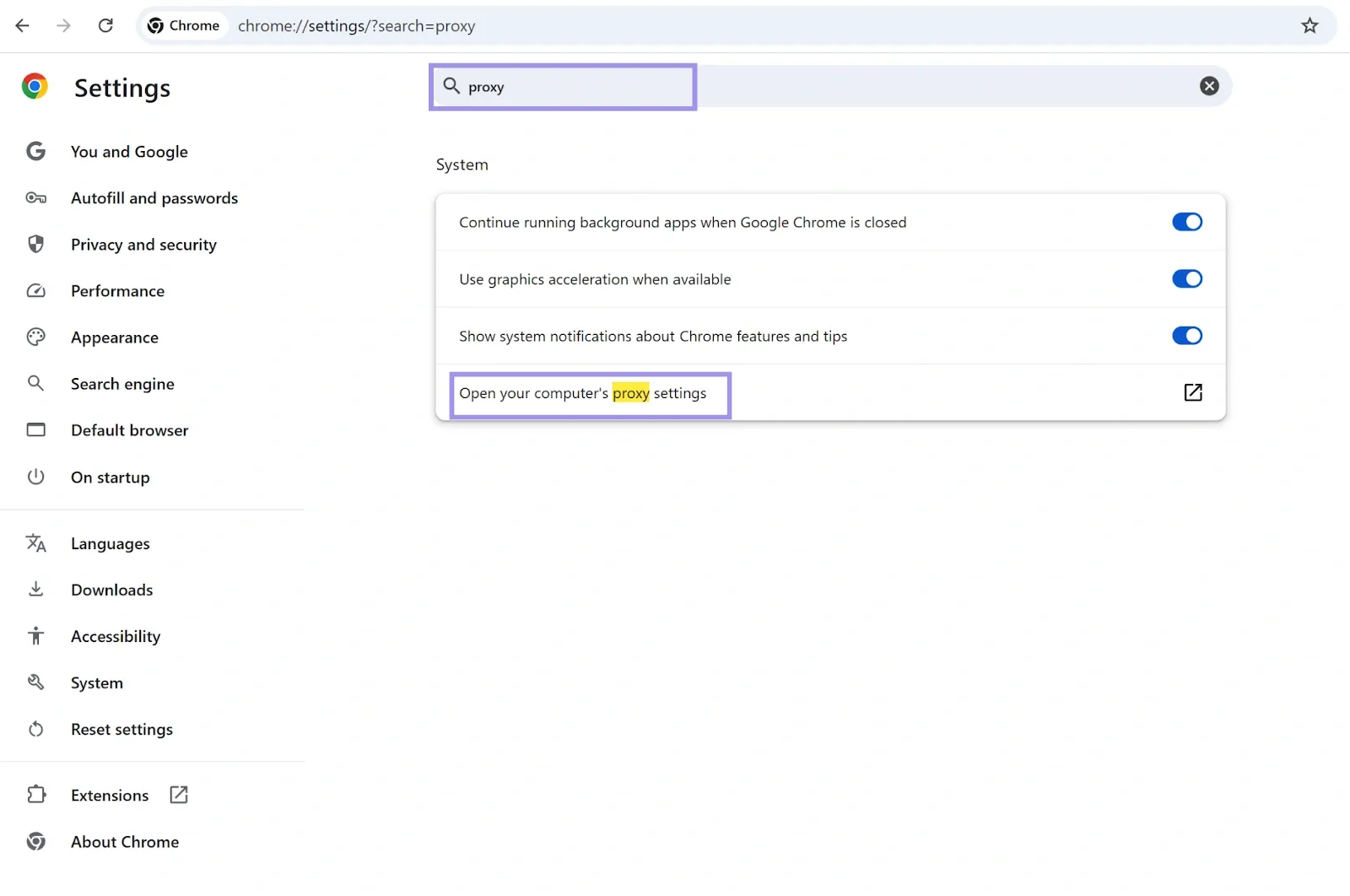
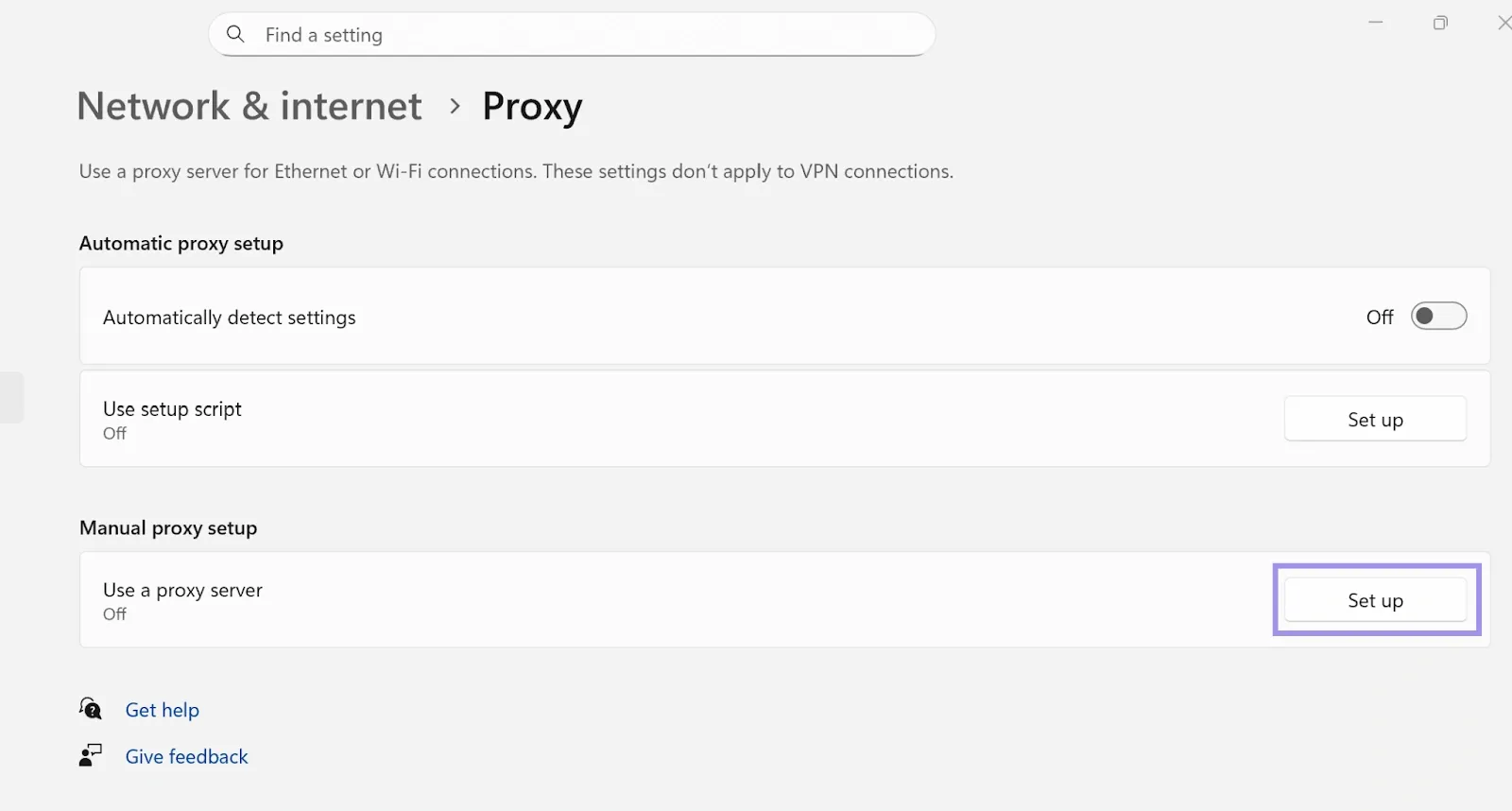
2. Select “Open your computer’s proxy settings”, which will direct you to the system-wide proxy configuration on your operating system. Under “Manual proxy setup,” click on the “Set up” button.
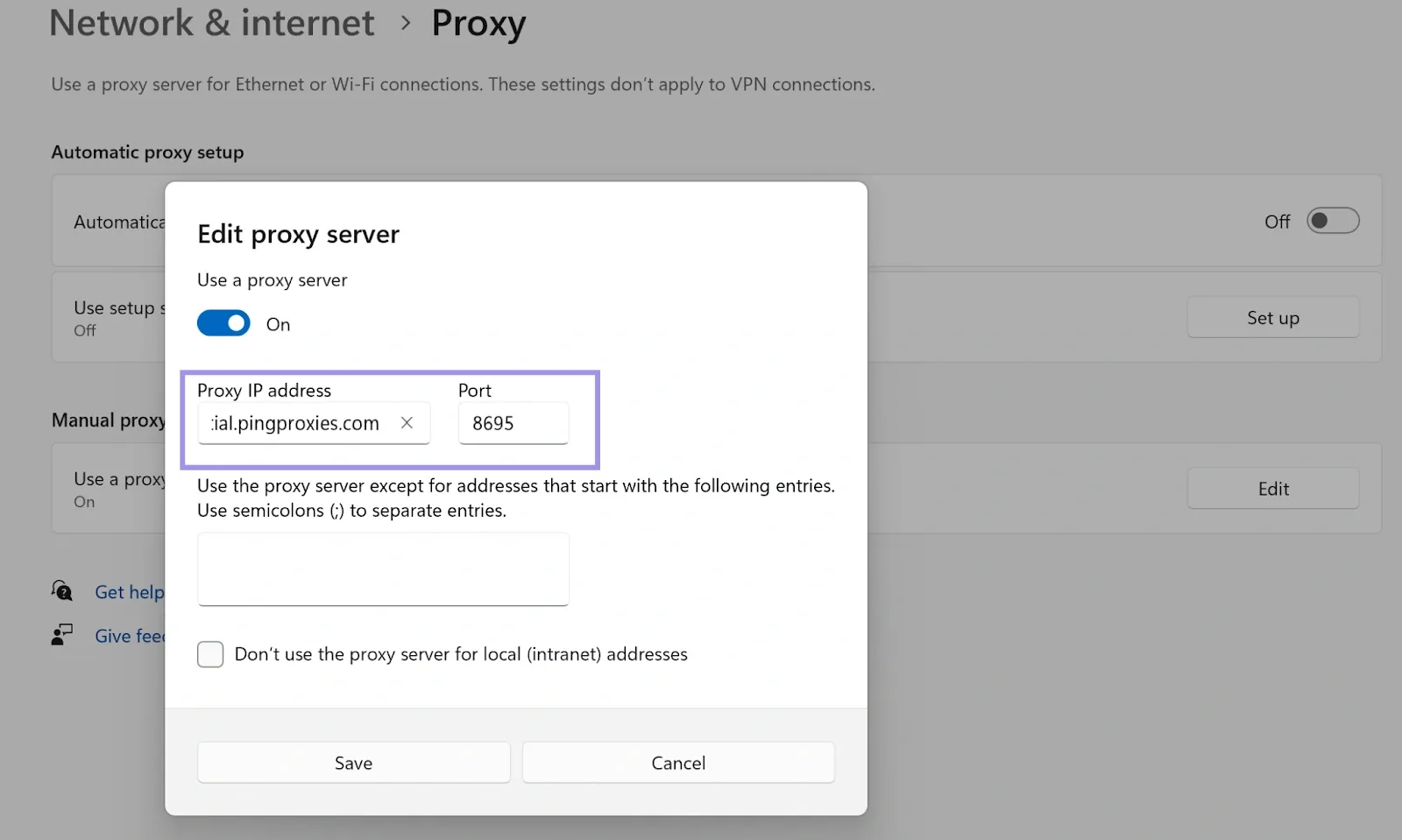
3. Turn the “Use a proxy server” on, and add the proxy hostname and port.
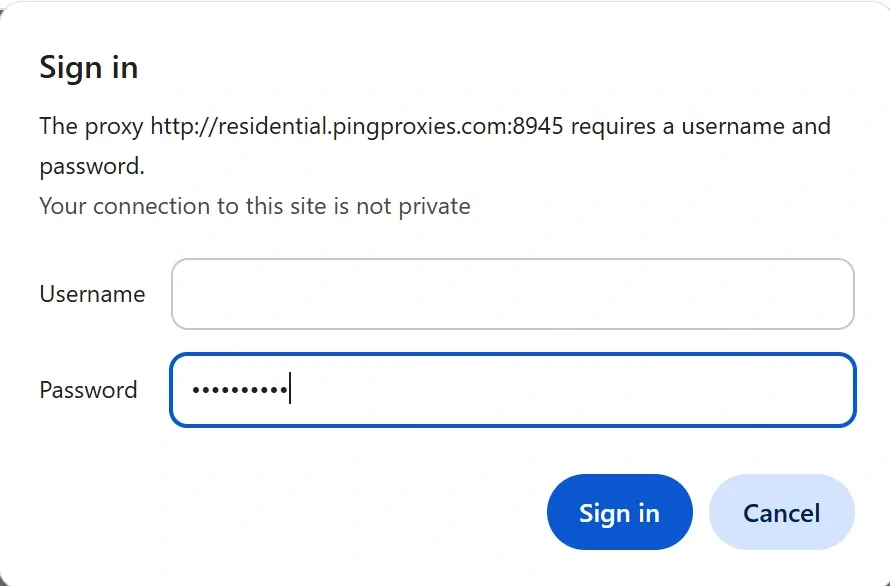
4. Save the changes, and you should be prompted for the username and password.
5. Finally, verify that your IP address has changed from your original one.
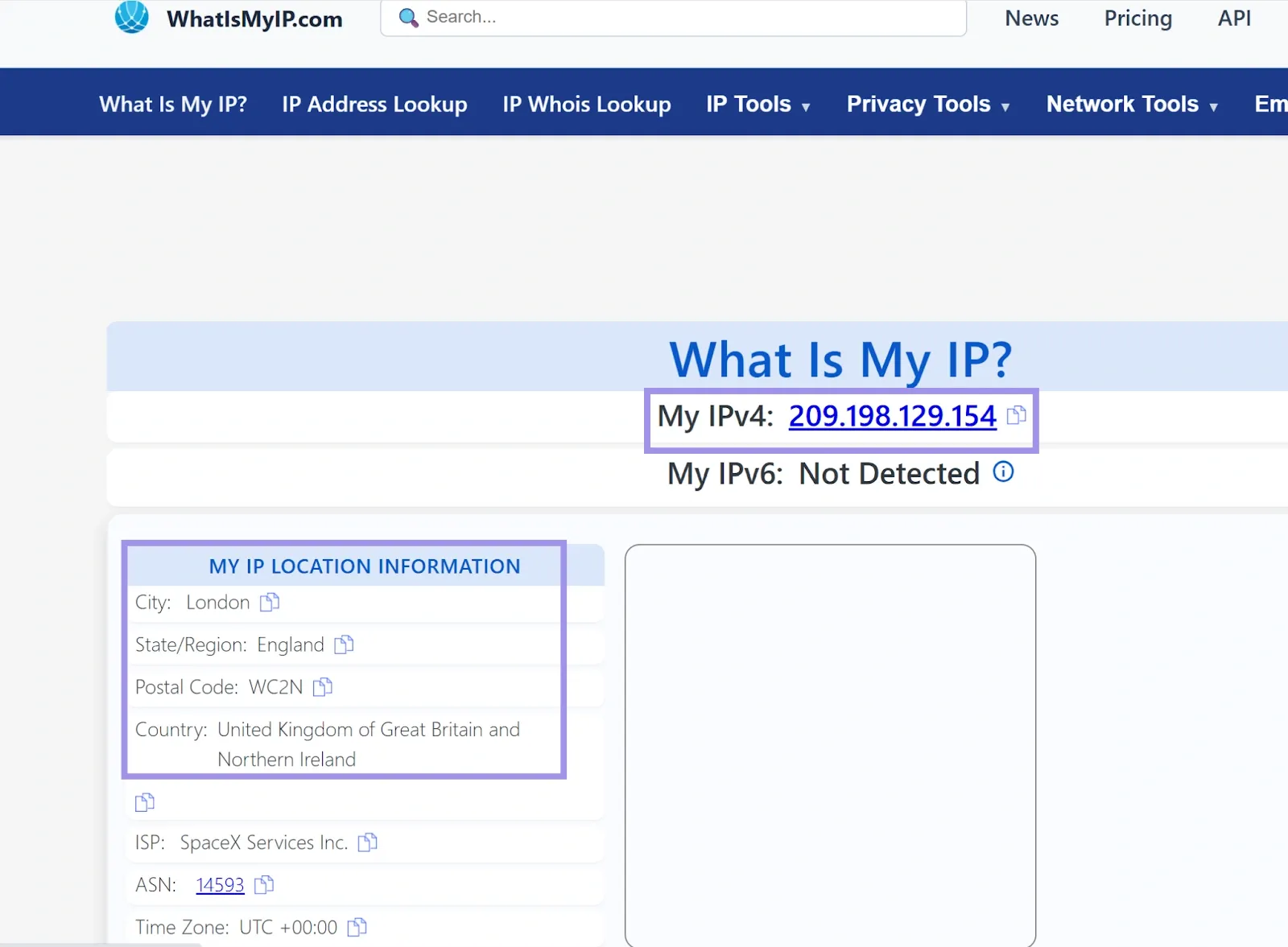
As we can see the IP address and other location details are changed, which means that the IP scrambler is successfully created and working.
If you’d like to check whether the proxy is working fine before adding it to your operating system or using it in any other application, you can use our Proxy tester.
It’s a free tool that verifies proxy connectivity and provides information about uptime, speed, and regional performance. All you have to do is give the list of proxies you want to check, add a target URL that you want to test access to through the proxy, and hit test. You’ll get the test results and can decide which proxy to use. You can also share or export the results of your test.
